Introduction
In the world of CRM platforms, Salesforce leads the chart. Spending in CRM will be around US$ 670 billion in 2022. Salesforce forms 19.5% of the global CRM market share. Now, when you start learning about Salesforce, you will come across the term Salesforce Map Class. But you must have wondered what it is exactly, right?
Well, no worries!
We are here with a complete guide on Salesforce Map Class which you should not miss!
So why wait? Let’s scroll down till the end into a holistic learning experience about map methods in Salesforce.
Learn Salesforce in the Easiest Way
- Learn from the videos
- Learn anytime anywhere
- Pocket-friendly mode of learning
- Complimentary eBook available

Salesforce Map Class - What Is a Map in Salesforce?
The Salesforce Map Class is a collection of Map methods in Salesforce. These are all instance methods, that is, they operate on a particular instance of a map.
The following are the instance methods for maps:
Salesforce Map Class Features
Build your own Salesforce application platform by understand everything about VisualForce Tags, layouts, and business models.
- A map is a collection of key-value pairs where each unique key maps to a single value. Map keys can be any primitive data type like string, integer,decimal, Id while values can be a primitive, sObject, collection type or an Apex object.
- Map Class keys and values can be of any data type—primitive types, collections, sObjects, user-defined types, and built-in Apex types.
- Map keys of type String are case-sensitive. Map methods, including put, get, containsKey, and remove treat these keys as distinct.
- The Salesforce Map gives value on the basis of the key.
- Key is always unique but a value can be duplicated.
Salesforce Map Class Constructors
The following are constructors for Map.
- Map
() - In the Map Class, this constructor creates a new instance of the Salesforce Map. T1 is the data type of the keys and T2 is the data type of the values. - Map
(mapToCopy) - This constructor generates a new instance of the Salesforce Apex Map Class. It initializes it just by copying the specified map entries. T2 is the data type of the values and T1 is known as the data type of the values. - Map
(recordList) - This Map Class constructor generates a new instance of the Map Apex class. Also, this constructor populates it with the sObject records’ passed-in list. The Map keys get populated with the IDs of sObject. Wherein, the values are known as sObjects.
Advance yourself with Salesforce Comprehensive Guide to perform real-time data analytics conveniently.
Salesforce Map Apex Class - Syntax
// Create a map to store ID and corresponding names MapexMap = new Map (); exMap.put(1, 'James'); exMap.put(2, 'Daniel'); exMap.put(3, 'Peter'); // Retrieve values from the map using their keys String name = exMap.get(1); String name1 = exMap.get(2); String name2 = exMap.get(3); // Log the retrieved values System.debug(name); // Outputs: James System.debug(name1); // Outputs: Daniel System.debug(name2); // Outputs: Peter // Retrieve the keyset and values of the map Set keySet = exMap.keySet(); List values = exMap.values(); // Log the list of values System.debug(values); // Outputs: [James, Daniel, Peter]
Once you’re familiar with the syntax and the fundamentals of Salesforce, mapping with it becomes simpler. Learn more with our Self-learning module.
Map Class Methods
The following are Apex Map methods. These are instance methods.
- clear(): Removes all of the key-value mappings from the map.
- clone(): Makes a duplicate copy of the map.
- containsKey(key): This Map Apex method returns true if the map contains - the If the key is a string, the key value is case-sensitive.
- deepClone(): DeepClone () method creates a duplicate copy of a map, including sObject records if the map has sObject record values.
- equals(map2): It compares a map with a specified map and returns true if both maps are equal; otherwise, returns false.
- get(key): This method returns the value of the specified key which is mapped, or it returns null if the map contains no value for this key.
- getSObjectType(): This method returns the value of the sObject type in format of key and value.
- isEmpty(): If the Salesforce Apex Map has zero key-value pairs it returns true.
- keySet(): Returns a set that contains all of the keys in the map.
- put(key, value): Associates the specified value with the specified key in the map.
- putAll(fromMap): Copies all of the mappings from the specified map to the original map.
- putAll(sobjectArray): Adds the list of sObject records to a map declared as
Mapor Map . - remove(key): This Map Class Salesforce method removes the mapping for the specified key from the map, if present, and returns the corresponding value.
- size(): Returns the number of key-value pairs in the map.
- values(): This method returns a list that contains all the values in the map. The values are returned in an arbitrary order.
get(key)
// Create a list to store accounts ListmyAccounts = [SELECT Id, Name FROM Account LIMIT 10]; // Create a map to store account Id and Name Map myAMap = new Map (); // Iterate through the list of accounts and populate the map for (Account a : myAccounts) { // Add account Id and Name to the map myAMap.put(a.Id, a.Name); } // Iterate through the map keys and log the account names for (Id aID : myAMap.keySet()) { System.debug(LoggingLevel.DEBUG, myAMap.get(aID)); }
putAll(fromMap)
// Create the first map and add an entry Mapmap1 = new Map (); map1.put('Red', 'LightRed'); // Create the second map and add an entry Map map2 = new Map (); map2.put('Blue', 'DarkRed'); // Add all entries from map1 to map2 map2.putAll(map1); // Log the values of map2 System.debug(map2.values()); // Outputs: (LightRed, DarkRed)
Having any plans for Salesforce development certifications? Here’s a free guide for you - A Comprehensive Guide for Salesforce Certification Preparation
remove(key)
// Create a map to store color names and their corresponding codes MapcolorCodes = new Map (); colorCodes.put('Red', 'FF0000'); colorCodes.put('Blue', '0000A0'); colorCodes.put('Green', '0000A0'); // Log the map contents System.debug('Printing === ' + colorCodes); // Outputs: Blue=0000A0, Green=0000A0, Red=FF0000 // Iterate through the map keys using a cloned keyset to avoid concurrent modification errors for (String key : colorCodes.keySet().clone()) { // Remove the 'Green' entry from the map if (key == 'Green') { colorCodes.remove(key); } // Log the updated map after each iteration System.debug(colorCodes); // Outputs: Blue=0000A0, Red=FF0000 }
Just thought of checking out whether you are an aspiring Salesforce developer? If yes, these top interview questions will be godsend for your Salesforce interviews!
Values ()
// Create a map to store color codes and their corresponding names MapcolorCodes = new Map (); colorCodes.put('FF0000', 'Red'); colorCodes.put('0000A0', 'Blue'); // Retrieve the values (color names) from the map into a list List colors = new List (); colors = colorCodes.values(); // Log the list of color names System.debug(colors); // Outputs: (Red, Blue)
getSObjectType()
MapacctMap=new map ([select name from Account limit 10]);for(string accValue:acctmap.keyset()){ system.debug(acctmap.get(accValue));}

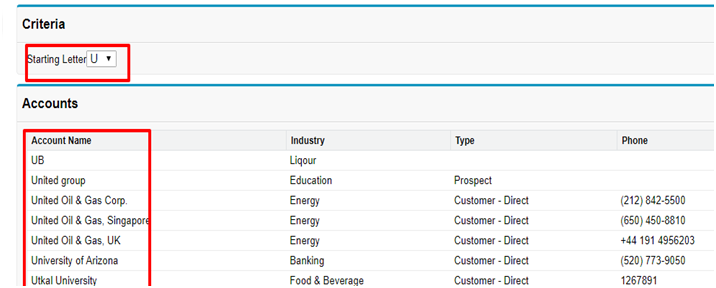
Example - How to display records on the basis of alphabet?
public class DynamicSearchExample {
    public Map> accountsMap { get; set; }
    public List keys { get; set; }
    public String selectedKey { get; set; }
    public Map accsByName { get; set; }

    public Set getMapKeys() {
        return accountsMap.keySet();
    }

    public DynamicSearchExample() {
        accsByName = new Map();
        List sortedKeys = new List();
        accountsMap = new Map>();

        accountsMap.put('All', new List());

        // Query all accounts
        List accs = [SELECT Name, Industry, Type, Phone FROM Account ORDER BY Name ASC];

        for (Account acc : accs) {
            accountsMap.get('All').add(acc);

            // Get the first character of the account name
            String start = acc.Name.substring(0, 1);
            List accsFromMap = accountsMap.get(start);

            if (accsFromMap == null) {
                accsFromMap = new List();
                accountsMap.put(start, accsFromMap);
            }

            accsFromMap.add(acc);
            accsByName.put(acc.Name, acc);
        }

        keys = new List();

        for (String key : accountsMap.keySet()) {
            if (key != 'All') {
                sortedKeys.add(key);
            }
        }
        sortedKeys.sort();
        sortedKeys.add('All');
        for (String key : sortedKeys) {
            keys.add(new SelectOption(key, key));
        }

        selectedKey = 'All';
    }
}
Output
That’s it for now!
Are you interested to learn more about Salesforce and exploring various career opportunities? Get a free but comprehensive guide at Salesforce Careers - Step By Step Salesforce Career Path
Finally on Salesforce Map Class
The Salesforce Map Class is essential to use in Salesforce as it makes it easy for writing the bulk apex class or trigger. Learning about the various elements of Map Apex Class is advantageous for Salesforce users and professionals. Becoming a PRO in Salesforce can help software developers earn a whopping US$ 110,000 on average.
However, as a beginner of Salesforce, you are unaware of various techniques that you can employ in script statements. In that case, learn all the skills necessary to be MASTER in Salesforce Training with JanBask.
You can also get a free consultation on the Salesforce career by connecting with us at JanBask Training.
Till then sign up with our newsletter to get more insightful guides on Salesforce. Do comment if our tips are helpful.
Happy Learning!




 Upcoming Class : September 8