
 JanBask Training
VMware was discovered in the year 1998 and it falls under the Umbrella of Dell Technologies today. The Company has its headquarter in California and it creates desktop or network virtualization software programs to streamline the IT operations across general infrastructure of the Company. This is a cloud-based technology that accounts for more than 70 percent sales of the Company and includes necessary technical support too.
What’s new in VMware?
The latest release by VMware includes a fresh user role i.e. VMware Administrator. This is an overwhelming moment for the VMware users where they can manage account without any assistance from the VMware. The VMware Administrator role is generally assigned to the super users, procurement contact or any other special user who has the right to manage accounts at the folder level. The privilege given to some VMware administrator includes –
- Viewing and supporting requests that are submitted by VMware users in the folders
- He can respond to the license upgrade requests in the folders.
- He can respond to the license deactivation requests in the folders.
- He also has the privilege to view orders or contracts tied to particular licenses in the folders.
Read More: Difference Between Hyper-v Vs VMware Vs Virtualbox
The addition of VMware administration role adds greater flexibility to manage accounts. Consider an example, where one customer has multiple accounts and the license needs to manage aggressively at the folder level. Here, the role of VMware administrator comes into play. The best part is that security risks have also been minimized to a larger extent with the addition of administrator role in the latest VMware platform.
If you are new to the VMware platform or even if you have some relevant experience, there are chances that you are not sure on the tasks that you need to perform regularly as a VMware administrator. Let us have a quick glance at the features that VMware admin needs to check regularly, almost every day to make sure everything is normal and running smoothly. 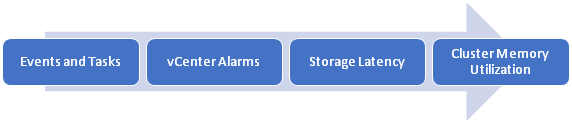
1). Events and Tasks
Tasks are something initiated by you and the events are the actions on tasks. You need to check daily what tasks have been initiated and the events happened as the result of the task.
2). vCenter Alarms
vCenter has more than fifty alarms defined by the default and gets activated itself at the time of installation. These alarms have been arranged to notify you or alert you to a plenty of things like memory utilization, events in actions, number of tasks initiated etc.
The problem is that you will never know about the notifications if vSphere Client is not open. There are two options either you check them daily or trigger the alarms at the highest level.
3). Storage Latency
Storage latency is the common issue for VMware users and you need to monitor the storage latency daily to avoid the unnecessary bottleneck.
4). Cluster Memory Utilization
The next biggest problem to address by VMware Admin is cluster memory utilization that needs to monitor regularly almost on the daily basis.
Now, you are sure about the role and job responsibilities of a VMware administrator. Let us see further how you could become a certified professional, what are salary options for you, and what future holds for VMware administrators.
Read More: Vmware Interview Questions and Answers
VMware Administrator Learning Path and Certification Overview
With more than 6 Lac customers in the global marketplace, VMware had dominated the server and desktop virtualization market share for years. The reason is Company always hire potential resources to manage, administer and support the VMware solutions. The majority of job roles associated with VMware profession is VMware administrator and system engineer. Here, is a list of certain skills that every recruiter wants to see on your resume – 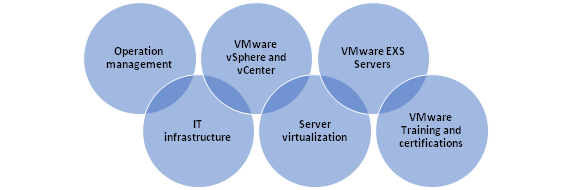
VMware Training and Resources
Visit our site JanBask Training to learn about VMware program and the related certifications. Usually, training and certification programs for VMware are expensive but we offer training at a fraction of costs only to make it affordable for everyone.
VMware Certification Overview
VMware skills and certifications look awesome on your resume. Generally, certifications are taken as a proof of your knowledge and skills for the particular technology and it increased the overall chances of grasping your dream job as compared to the other candidates. The only condition is that certification should be made with reliable authorized training providers only like JanBask Training.
Today, VMware certifications are a must-have requirement for the people especially who are interested to work in data centers to support virtual environments. Be aware that VMware certifications are based on associated technology. The certifications standard change as soon as technology changes. Deciding on the right certification for you is always a challenge and only a reliable IT partner can help you in making the right decision for your career.
Salaries and the Market Details
Based on your experience and the size of the industry, the average salary of VMware administrator generally varies from $56K to $130K. The average salary for VMware administrator depends on various factors like education, degree, skills, training, or certification. The two major influencing factors that decide on the final salary is industry size and the experiences.
Below is a graph to give a better understanding of the salaries and the market details to make you sure how much can you earn as a VMware Administrator. 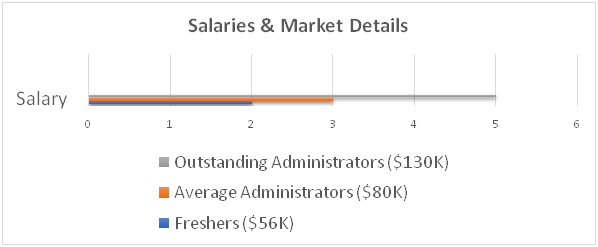
Future Career Scope of VMware Administrator
VMware is evolving technology for cloud-computing services and the virtualization in an organization. The popularity of the technology is the reason why VMware has a plenty of job options and career prospects for the IT professionals. VMware solutions have given a new direction to the organization and reduced the overall infrastructure costs too as needed by the organizations.
You would not believe but this is true that now you can switch between two operating systems quickly like you switch between the tabs. This is the technology that allows you to analyze, modify or test issues encountered in another OS without changing the system. This may be the case that you need to work with certain VMware tools but you can always learn and install them as per your convenience.
There is no scope for VMware career letting down in the future. Also, you can increase your chances of getting hired with proper training and certification.
Would like to start an awesome career in VMware? If yes, register with JanBask training and get assistance from real-time experts now.


 Upcoming Class : October 30